

I wanted to get a post to document what I believe is the best free, easily accessible, and efficient LS-Dyna text editor setup.
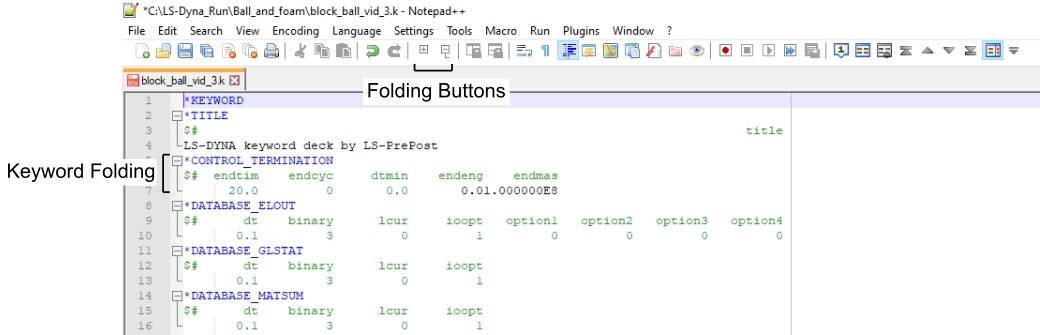
Notepad ++ with the LS-Dyna language and folding enabled with toolbar buttons and a vertical edge guide.
Steps:
- Download Notepad ++
- Download LS-Dyna User Defined Language
- Either copy downloaded LS-DYNA_UDL.xml to your Notepad++ userDefineLangs folder (C:\Users\xx\AppData\Roaming\Notepad++\userDefineLangs) or import the file in Notepad ++ Language -> User Defined Language -> Define your language -> Import
- Select LSDYNA language
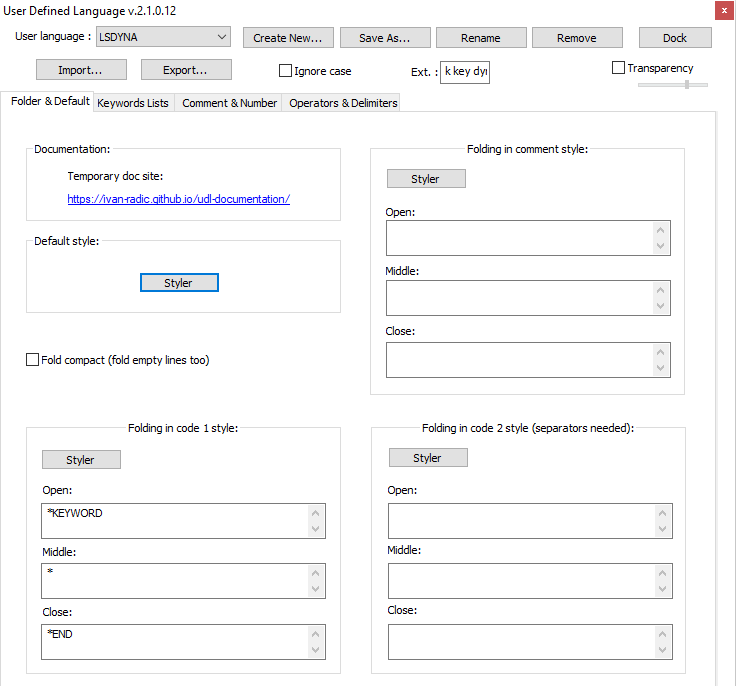
- In the Notepad ++ User Defined Language menu, modify the Folding in code 1 style
- Open: *KEYWORD
- Middle: *
- Close: *END
- Add fold and unfold buttons to top toolbar
- Add Customize Toolbar plugin: Plugins -> Plugins Admin -> search for "Customize Toolbar"
- In Customize Toolbar: Add Fold All and Unfold All
- Remove unnecessary buttons and organize how you want
- Add vertical edge guide
- Settings -> Preferences -> Margins/Border/Edge -> input 81 in Vertical Edge Settings (80 is the limit for standard LS-Dyna input)
- Settings -> Style Configurator -> Global Styles -> Edge colour -> Foreground color: Grey (can be whatever you want)
Now you should be able to fold all, unfold all, and fold and unfold individual keywords which makes modifying Dyna files so much easier.
I use this a lot when removing large keywords like *Node after settling etc. If you delete something while folded, make sure you click at the start of the line you want to remove and shift click at the start of the next line. This way you won't end up with a blank line which will give you an error.
Let me know if I'm missing any steps or if you have issues getting this working.